NuSphere PhpED |
|
|
Version: 6.0
License(s): Commercial
Price: depends on version (Standard/Professional/Advantage)
Platform(s): Windows
More Reviews: See more reviews
|
|
|
NuSphere PhpED Description |
The staff of php-editors.com recently spent a few days working with NuSphere PhpED 6.0 (a popular PHP IDE) and Nu-Coder 3.0 (a PHP Encoding Utility).Below is the summary of NuSphere's Editor features. Also please read this review of PhpED 5.9.5 - the previous version of the IDE. Fresh review is on its way
NuSphere PhpED v6.0 - an Integrated Development Environment for PHP
NuSphere PhpED is a complete platform for developing PHP-based applications, both Web and CLI. With code intelisense support for JavaScript, HTML and CSS PhpED 6.0 is a complete solution for web developers.
Create.
The robust editor with plethora of helpful editing features to create PHP scripts as well JavaScript, HTML and CSS. HTML 5 and CSS 3 are also supported
Debug.
Powerful PHP Debugger is one of the strongest PhpED features.
Profile.
Eliminate all bottlenecks of your code with the help of PHP profiler.
Deploy.
Secure, fast and flexible publishing of PHP scripts to a remote server.
Integrate.
Use third party tools like php encoders, formatters or html validators in PhpED.
New in PhpED v6.0: - JavaScript Code Completion and Find Declaration
Code Completion will show the hints for functions, variables, classes and methods and Find Declaration feature will take you right where the function is defined - Support for CSS3 Syntax
CSS code completion now supports CSS3 features - Support for ALL HTML Standards/Versions
Giving the user an ability to set HTML parsers to any of 3.2, 4.0, xhtml or 5.0 version, PhpED 6.0 serves all of your front end needs as well as back end. - Even Faster PHP IDE
PhpED's main claims to fame are PHP Debugger and the speed of the Editor. PhpED 6.0 runs even 15% faster - Support for Windows Share/Samba for fast project deployement
In addition to FTP/SFTP and WebDav Project and Files can now be published with Windows Share/Samba/SMB . - Unload Projects from Workspace
Users can control memory consumption of the Editor by using this new feature to unload inactive projects from IDE memory
Other IDE features:
Coding and Analyzing - Code highlighter for PHP, XML, XHTML, HTML, CSS and JavaScript.
Advanced code-completion. PhpED supports object-oriented coding for PHP, as well as JavaScript, HTML or CSS code. - Code templates allow to type whole code fragments at once by a single key press.
Hints show arguments, returning value, and a short description for a typed function. - Fast functions reference shows all the PHP functions as they are available from PHP extensions.
- Goto definition function available for both PHP and JavaScript
Project-wide code analyzer shows all php classes, methods, properties, functions and variables in every detail and facilitates object-oriented programming. Code Analyzer also works for JavaScritp, HTML and CSS. - Code Explorer and Code Navigators for PHP , JavaScript, HTML and CSS. Settings are available to specify with language constructs need to be shown in the code explorer and code navigators for each supported language
- Advanced PHP profiler. PhpED profiler shows executing time for each line, function or module of the code with tenth millisecond`s precision. You can locate all the bottlenecks quickly and efficiently.
Secure Deployment - Support for FTPS (TLS/SSL) and WebDAV/HTTPS (SSL) protocols make deployment and data transfer secure now.
- Fast deployment with Windows Share (Samba)
- Support for international character sets
Support for international character sets, including UTF-8. PhpED IDE can be used to create web sites in different encodings. Extended IDE functionality - Integrated MySQL or SQL lites clients allow connecting to a database from one IDE.
- Use a number of embedded tools for more effective coding, editing and code management. PhpED IDE includes pre-configured phpDocumentor, HTMLTidy and CVS client.
- NuSOAP compatibility. Supplied NuSOAP library allows to build a Web Service quickly. No WSDL creation required, everything is done on the fly.
- Help subsystem supports CHM tutorials. PHP, HTML, MySQL, PostgreSQL, CSS, JavaScript and XML manuals are included.
Platforms supported:
Windows 7, Vista, XP, 2003
System Requirements:
256MB RAM (recommended: 1GB), 150 MB disk space
|
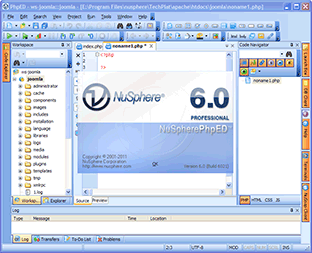
NuSphere PhpED Screenshot |
|
NuSphere PhpED Comments |
Top class IDE, many, many people love it. Runs very fast and has all the features you would expect from a top of the range IDE.
Test the trial version and see what you think, I`m sure you will love it also.
Do not forget to check out our new detailed review of PhpED and PHP-Coder.
Visit the NuSphere PhpED Website.
|
NuSphere PhpED Users Comments/Reviews |
|
|
|
|